
“My shop doesn’t show up on Google Maps at all.”
“Competitors nearby show up at the top of the map, so why don’t we?”
More and more owners of shops and other local businesses are coming to us with concerns like these.
As smartphones have spread, the number of people who find shops by searching for “○○ near me” grows every year. MEO is the set of measures for improving where you rank on Google Maps.
MEO means measures that help your shop or location rank higher in Google Maps search results. It is easier to get started with than SEO and costs nothing to begin. Its core is three things: filling out your Google Business Profile, reviews, and keeping up with photos and posts.
One of its strengths is that it’s easier to work on than SEO. This article explains MEO from the basics through concrete ways to aim for top rankings on Google Maps, in a way that beginners can follow.
What Is MEO? How It Differs from SEO
What MEO Means
MEO stands for “Map Engine Optimization.” In Japanese, it is called “map engine optimization” (マップエンジン最適化). Specifically, it refers to measures for getting your shop or location to appear near the top of Google Maps search results.
In fact, the term “MEO” is used only in Japan. Outside Japan, it is generally called “Local SEO.” The meaning is almost the same, but this article uses the familiar term “MEO” throughout.
Sorting Out the Difference Between SEO and MEO
SEO and MEO are often confused, but they differ in purpose and target.
| SEO | MEO | |
|---|---|---|
| Target | Regular Google search results | Google Maps search results |
| Main place you appear | Search results page | Local pack + Google Maps |
| Main tool you work on | Your website | Google Business Profile |
| Cost | Medium to high | Low (you can start for free) |
| Time until results | 3–6 months or more | About 1–3 months |
The Value of Appearing in the Local Pack
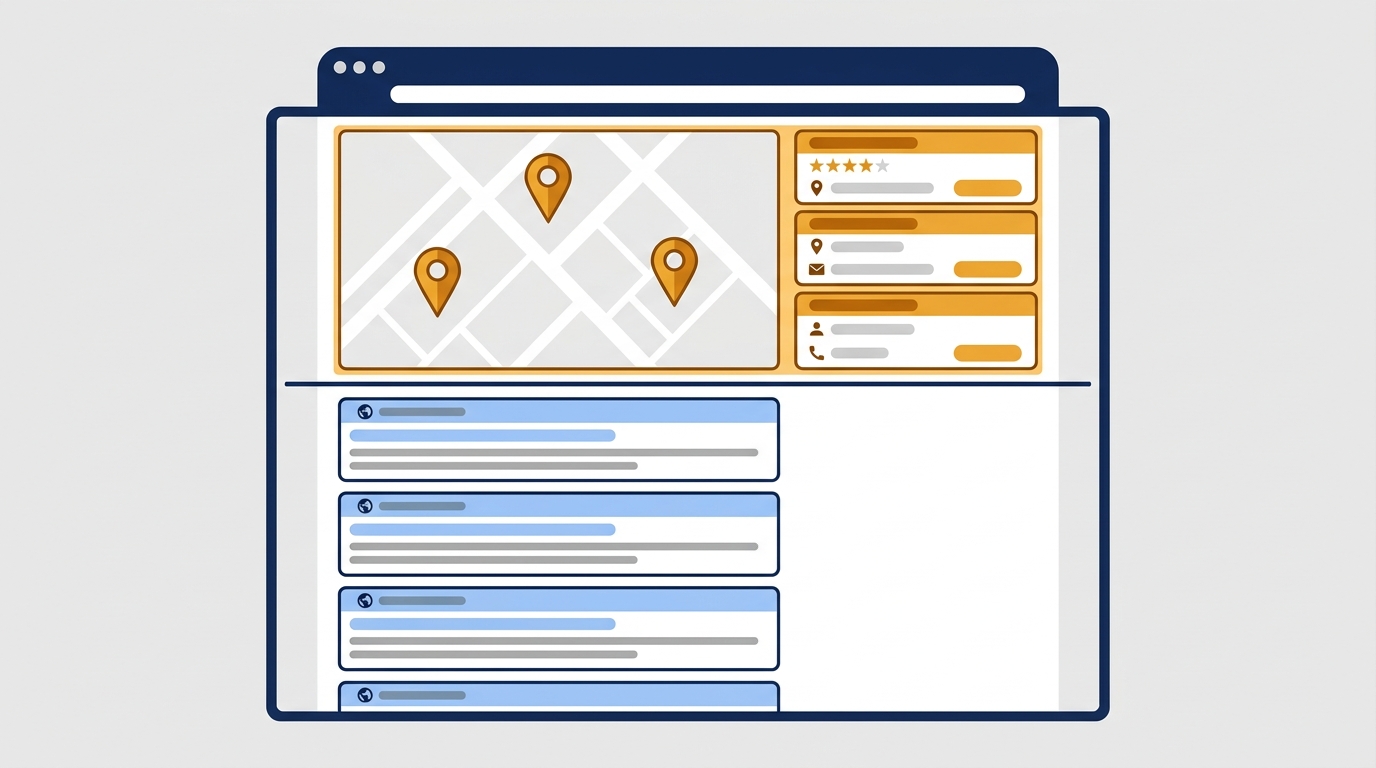
When you search for a place name plus a type of business, such as “Shibuya ramen” or “Yokohama dentist,” a map and three business listings appear above the regular search results. This is the “local pack.”
Because the local pack appears at the very top of the search results, it stands out more than the regular SEO results. According to one study, businesses shown in the local pack can see about five times the click-through rate of regular search results in some cases.
In other words, getting into the top three through MEO is like getting a sign in a prime location without spending money on ads.
How Are Google Maps Rankings Decided?
The Three Factors Google Officially Lists
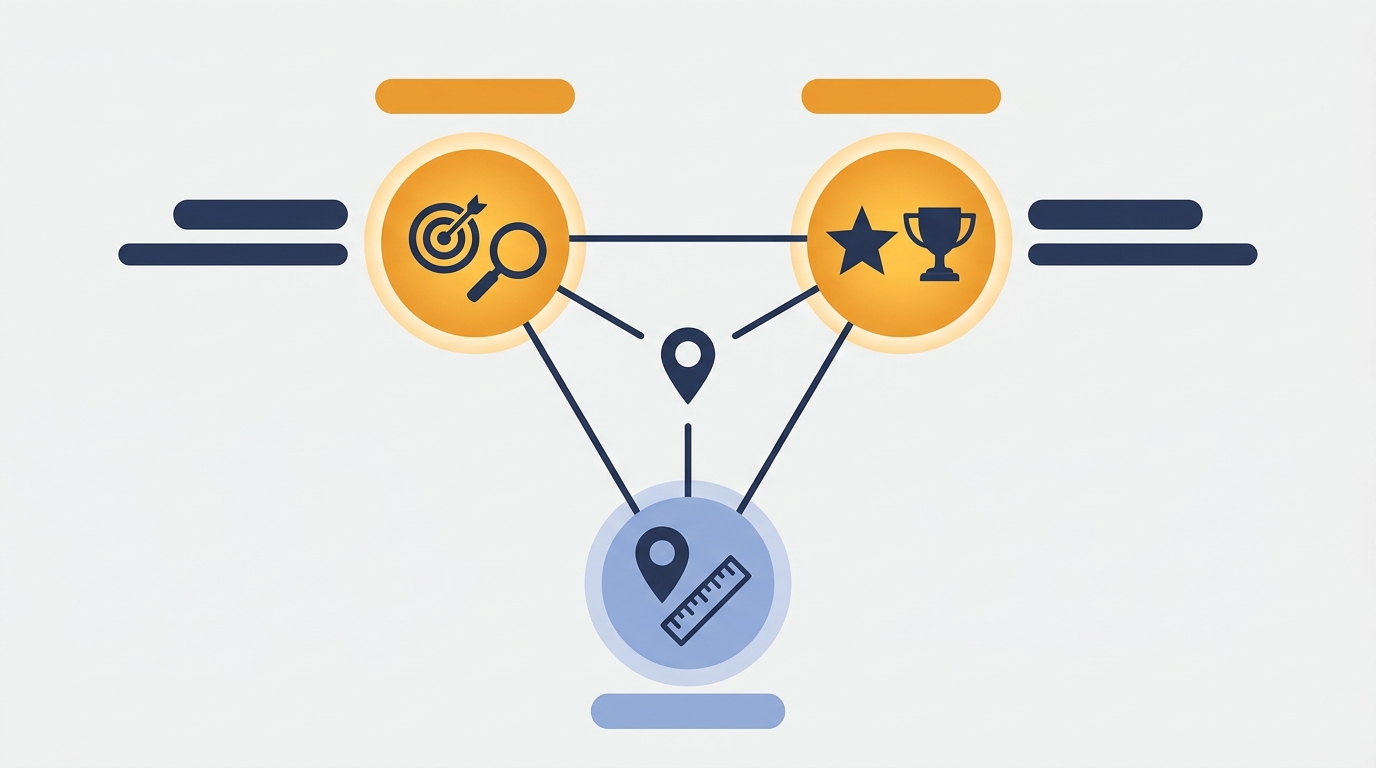
According to Google’s official help, local search rankings are determined by the following three factors.
1. Relevance
How well your Google Business Profile information matches the search keywords. If your business description and category settings are appropriate, your relevance goes up.
2. Distance
The physical distance from where the searcher is to your shop or office. This factor is hard to influence, but on the flip side, you naturally have an advantage with customers who are nearby.
3. Prominence
The number and rating of reviews, how much the business is mentioned on the web, the number of links, and so on: how well known the business is. This is the factor you should put the most effort into with MEO.
To Be Honest, Everything Except “Distance” Can Be Improved
Distance is physical, so you can’t change it. However, “relevance” and “prominence” can be improved significantly depending on what you do. And the center of improving these two is optimizing your Google Business Profile (GBP from here on).
The First Step: Optimizing Your Google Business Profile
Registering for GBP and Entering Basic Information
The first step in MEO is registering for a Google Business Profile and filling in 100% of the basic information.
If you haven’t registered for GBP yet, you can register for free at Google Business Profile. If you’re already registered, check that all of the following items are filled in.
- Official business name (written the same way as on your sign and business cards)
- Primary category + additional categories (as specific as possible)
- Address (an exact match with your website and social media)
- Phone number (a landline number with an area code is preferable to a mobile number)
- Business hours (including holidays and temporary closures)
- Website URL
- Business description (up to 750 characters; naturally include your area name and what services you offer)
- Services and menu (details of the services you provide)
- Attributes (parking available, cards accepted, barrier-free access, and so on)
Choosing Categories Matters More Than You Might Think
To be honest, the GBP setting that is most often overlooked is category selection.
For your primary category, choose the one that “best describes your business.” Then, by adding additional categories, you get more chances to appear for related keywords.
For example, for an Italian restaurant:
- Primary category: “Italian restaurant”
- Additional categories: “Pizza restaurant,” “Pasta shop,” “Wine bar”
Your choice of categories alone can make a big difference in search results, so we recommend looking into which categories your competitors have set.
Web制作・システム開発は
First CHにお任せください
「こんなWebサイトが欲しい」「このシステムは実現できる?」——
現役エンジニアが直接お話を伺い、最適な進め方をご提案します。
「まだ構想段階」「費用感だけ知りたい」というご相談も歓迎です。
Reviews: The Biggest Way to Stand Out in MEO
The Number and Rating of Reviews Directly Affect Rankings
Within “prominence,” one of Google’s ranking factors, reviews have the greatest influence.
There are two reasons reviews matter.
- They directly affect search rankings: businesses with more reviews and higher ratings tend to rank higher
- They influence the decision to visit: there is data showing that about 78% of consumers “trust online reviews”
If you’re thinking, “But we have hardly any reviews…,” don’t worry. What matters is not just waiting for reviews to come in naturally, but actively taking steps to collect them.
Three Ways to Get More Reviews
1. Ask directly after providing your service
This is the simplest and most effective method. Say something like, “If you don’t mind, we’d be delighted if you could share your thoughts on Google.” The best timing is the moment when the customer is most satisfied.
2. Put up a QR code
Turn the link to your Google review page into a QR code and place it next to the register, on the counter, or on tables. Customers can jump to the review page just by scanning it with their smartphone, which greatly lowers the barrier.
3. Include a review link in follow-up emails
Add a link to your review page in follow-up emails after a transaction is completed or a service is provided.
Important caution: Google’s guidelines prohibit offering monetary rewards (discounts, gifts, etc.) for reviews. Measures like “10% off if you write a review” are not allowed. Fake reviews you write yourself and reviews by staff also violate the rules.
Treat Replying to Reviews as “Required”
When you get a review, always reply, whether it’s positive or negative.
- Positive reviews: thank the reviewer and mention specifics from their review (avoid sounding like a template)
- Negative reviews: don’t get emotional; respond sincerely and show your intention to improve
- When to reply: within 48 hours if possible
Businesses that reply carefully to reviews not only earn more trust from customers but also improve how Google rates them.
Bringing Your GBP to Life with Photos and Posts
Adding Photos Shows You’re “Actively in Business”
According to Google’s research, businesses with plenty of photos get 35% more clicks to their website than businesses without them.
Here are examples of photos you should add.
- Exterior: take it together with a nearby landmark building (so customers don’t get lost)
- Interior: photos that convey the atmosphere inside
- Products and services: photos of the products and services you actually provide
- Staff: showing faces gives people a sense of reassurance
- Customers: with their permission, photos that convey a lively atmosphere
Even two or three photos a month is fine. What matters is continuing to add new photos regularly. This sends Google the signal that “this business is still actively operating.”
Use the “Posts” Feature
GBP has a posts feature that lets you share the latest news, campaign information, and more. Surprisingly few businesses use it, so simply posting consistently sets you apart from competitors.
Examples of posts:
- Introducing a new menu item or new service
- Seasonal campaign information
- Changes to business hours over the New Year holidays or Golden Week
- Staff introductions or a behind-the-scenes look at your shop
Aiming for about one post a week makes it easier to keep going.
Boosting MEO by Linking It with Your Website
Make Your NAP Information Consistent
NAP stands for Name (business name), Address, and Phone (phone number).
In MEO, it is extremely important to keep your NAP information exactly the same everywhere: GBP, your website, social media, portal sites, and so on.
Even variations in notation, such as “1丁目2番3号” versus “1-2-3,” can cause confusion for Google. Use exactly the same notation, character for character.
Add Structured Data to Your Website
Adding LocalBusiness structured data to your website makes it clear that the information matches your GBP, which helps improve how you are evaluated for MEO.
Structured data is explained in detail in “What Is Structured Data (Schema)? Benefits and How to Set It Up,” so please take a look at that as well.
Include Local Keywords Naturally on Your Pages
By naturally including your area name on each page of your website, as in “○○ Clinic, serving Shibuya Ward for 20 years” or “a renovation specialist in Kohoku Ward, Yokohama,” you increase your relevance in local search.
However, stuffing in keywords backfires. Always use them in a natural context.
Common Mistakes and How to Deal with Them
Mistake 1: Registering for GBP and Then Leaving It Alone
This is the most common mistake. GBP isn’t “done once you register”; it needs ongoing management.
Google rates “businesses that are updated regularly” highly. At a minimum, add photos, post, and reply to reviews at least once a month.
Mistake 2: Posting Fake Reviews
Having yourself, your employees, or your friends write reviews because “we just want more reviews for now” is a violation of Google’s guidelines. If it’s discovered, you risk not only having the reviews removed but also having your GBP account itself suspended.
Mistake 3: Ignoring Negative Reviews or Arguing Back Emotionally
Responding to negative reviews is difficult, but ignoring them or arguing back emotionally is the worst response.
Other users are watching “how you respond to negative reviews.” A sincere, calm reply is actually a chance to increase trust.
Mistake 4: Falling for Inappropriate Sales Pitches from MEO Companies
Be careful with sales pitches like “We guarantee a top ranking on Google Maps for ○○,000 yen a month.”
To be honest, Google Maps rankings involve factors such as distance, so a top ranking is not something anyone can “guarantee.” Some companies even use methods that violate the guidelines (large numbers of fake reviews, keyword stuffing, and so on). Even if such methods produce results in the short term, they carry the risk of eventually being penalized.
Summary: MEO Is “the Most Powerful Way to Attract Customers That You Can Start for Free”
To sum up the basics of MEO, here are the steps.
- Register for GBP and fill in 100% of the basic information
- Actively collect reviews and reply to them carefully
- Add photos and posts regularly
- Make your NAP information consistent with your website and add structured data
- Keep managing it on an ongoing basis
The biggest appeal of MEO is that you can start today without spending money. Google Business Profile is free to use, and managing reviews and adding photos don’t cost anything either.
One more important point is linking with your website. Rather than relying on GBP alone, having a solid website multiplies the effect of MEO. It’s important that customers who visit your website from GBP find the information they need to think, “I want to work with this company.”
In supporting MEO for clients’ local businesses, I have personally seen cases where optimizing GBP and linking it with the website alone led to a large increase in inquiries coming through Google Maps.
If you’re thinking, “I want to start MEO on my own, but I don’t know where to begin,” or “I’d like advice on linking my website and GBP,” feel free to contact us.
Web制作・システム開発は
First CHにお任せください
「こんなWebサイトが欲しい」「このシステムは実現できる?」——
現役エンジニアが直接お話を伺い、最適な進め方をご提案します。
「まだ構想段階」「費用感だけ知りたい」というご相談も歓迎です。







