
“We signed a company contract for ChatGPT and gave everyone an account. It was the talk of the office for the first few weeks, but now only a few people open it once in a while.” At companies that have brought in AI, this pattern is not unusual. The subscription fee goes out every month, but nobody can explain how the work has changed. At that point it is tempting to conclude, “Maybe it was too early for us,” and simply cancel.
However, the reason it stopped being used is usually not the AI’s capability or employees’ motivation. It is how it was introduced. The work it would be used for was never decided, it was left entirely to one person, or the first attempts fell short of expectations and people drifted away. Problems like these can be fixed if you deal with them one at a time.
This article covers the typical reasons AI stops being used, the steps to turn things around, and the systems that keep it in use inside the company. At the end, it also gives criteria for deciding whether to use outside hands-on support.
The biggest reason AI stops being used inside a company is that it started with “please try using it” before anyone decided “what to use it for.” To turn things around, do not roll it out to the whole company again. Instead, start over by choosing just one task that repeats every week and building AI into the steps of that task. Then set up three things: a place to share templates for how to use it, someone to ask when people get stuck, and a monthly review. With those in place, it is less likely to stop even if the person in charge changes. Outside hands-on support is worth considering when you cannot assign someone internally to lead the effort, or when you are stuck deciding where to start.
The Common Path to AI Falling Out of Use
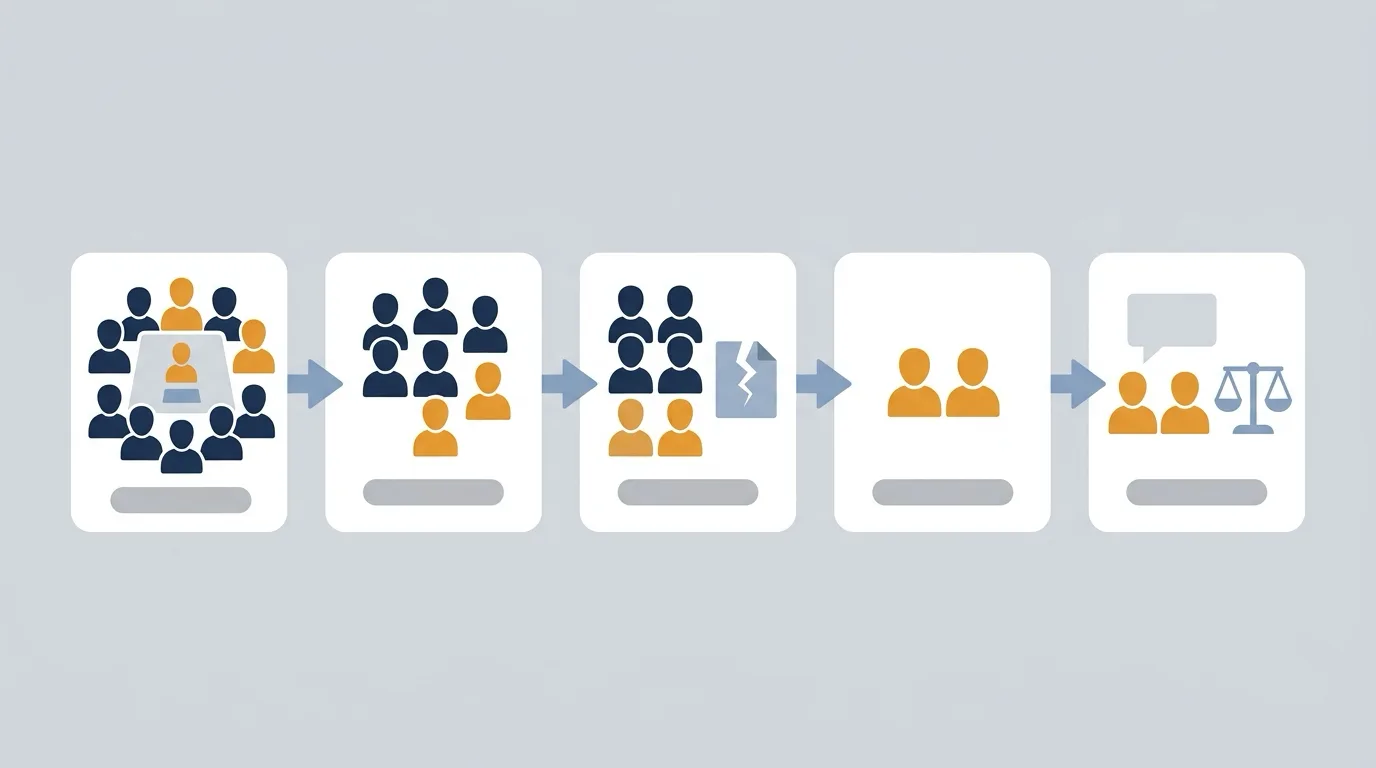
First, let’s look at the path commonly seen at companies where AI falls out of use. Knowing which stage your company stalled at makes it easier to choose how to turn things around.
- Right after adoption: Accounts are handed out with the message, “Feel free to use it in your work.”
- The first few weeks: Interested people try it for drafting emails or looking things up. It becomes a topic of conversation.
- Disappointing experiences: It returns plausible but wrong answers, or fixing its output takes time, and some people feel “it’s faster to do it myself.”
- Usage narrows to a fixed few: Only one or two people who were already IT-savvy keep using it, and everyone else stops opening it.
- No way to evaluate it: When the owner asks, “What has the effect been?” nobody can answer. Whether to continue the subscription comes up for discussion.
What is easy to overlook in this path is that at stage 2, “what to use it for” was left to each individual’s judgment. People who can figure out uses on their own keep using it, but for everyone else AI remains “a screen where I don’t know what to ask.”
Five Reasons AI Stops Being Used Inside a Company
The details differ from company to company, but most cases come down to one of the following five reasons, or a combination of them.
① No defined situations for using it
A tool that “can be used for anything” is, put another way, a tool where “you have to decide for yourself what to use it for.” If nobody has decided which tasks, at which points in the work, will be handed to AI, people won’t think of it on busy days. Making each employee figure out their own uses is the way of starting that is most likely to stall.
② It is left entirely to one person
Another common pattern is to put one person in charge “because they seem to know about it” and leave spreading it across the company to them as well. When that person also has their own regular duties, the work of spreading it tends to get pushed back. If that person is transferred or leaves, nobody knows how to use it anymore.
③ People leave after the first failure
Generative AI sometimes writes things that are untrue in plausible-sounding text. If that happens with the first question someone tries, they are left with the impression that it is “a tool you can’t trust,” and they don’t come back. The problem is not that AI makes mistakes, but that people tried it without knowing how to use it on the assumption that it will make mistakes. If it is used to produce drafts that a person checks, or to summarize internal documents you give it, mistakes can be caught at the checking stage.
④ The results aren’t visible
“It’s kind of convenient” is not a reason to keep going. If nobody records which tasks became how much easier, there is nothing to base a decision on when the subscription is reviewed, and the conclusion easily becomes “if it isn’t being used, cancel it.”
⑤ People don’t know what they may enter, so they’re afraid to use it
Using it without being able to judge whether it is OK to enter customer names or transaction amounts is unsettling. Without rules, the more careful someone is, the less they use it. Conversely, people who enter information without a second thought because there are no rules pose a different risk to the company.
- You cannot name the work AI is used for in terms of specific tasks
- Only one person in the company can explain how to use AI
- You have heard people say “AI makes mistakes, so it’s useless”
- You cannot explain what AI has made easier with numbers or concrete examples
- Rules on what information may and may not be entered are not written down
Turning It Around Starts With Checking the Current State and Narrowing the Work
First, check how it is being used now
Before starting to turn things around, check the current situation. If you skip this and jump to “let’s hold another training session,” you will stall at the same point.
You want to confirm the following three things.
- Who is using it, and for what: Ask the people who still use it which tasks they use it for. Uses that have lasted are candidates to spread across the company as they are.
- Why the people who stopped using it stopped: Don’t ask in a way that sounds like blame; ask “where it became a hassle.” It is enough to find out which of the five reasons above applies.
- The tools you subscribe to and the number of accounts: Knowing how many accounts are unused lets you make decisions about the subscription later.
This check doesn’t have to be interviews with everyone. Just talking with two or three people in each department is enough to see trends in why it stalled.
Narrow the work AI is used for to one task
Once you understand the current state, set the company-wide rollout aside for now and choose just one task to use AI for. Once there is a real sense in one task that “this got easier,” it becomes easier to move forward with expanding to other work.
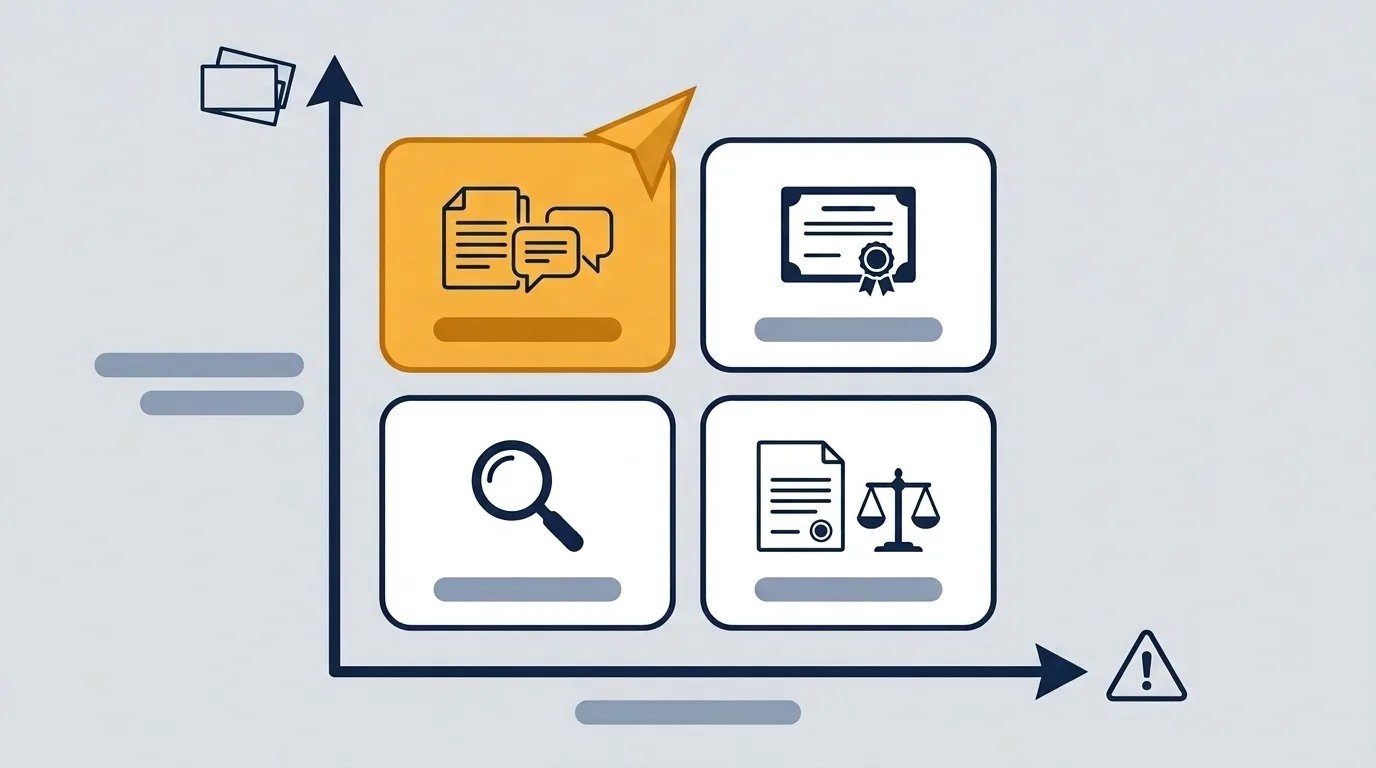
When choosing, thinking along the following two axes makes the decision easier.
| Small impact if it makes a mistake | Large impact if it makes a mistake | |
|---|---|---|
| Repeated frequently | The work to choose first (e.g., drafting internal documents, summarizing meeting minutes, drafting replies to inquiries) | After the steps and checks are firmly set (e.g., wording of quotes, notices to customers) |
| Repeated infrequently | Fine to leave to individual initiative (e.g., occasional research) | Don’t use it for now (e.g., judgments on contracts, judgments on tax matters) |
What you choose first is work that repeats every week and where mistakes can be fixed internally. How to list candidates is explained step by step in “How to Find Office Tasks AI Can Reduce.” With frequently repeated work, chances to use it come up naturally. With low-impact work, there is less worry that people will leave after the first failure.
Once you have chosen the work, write the step where AI is used into the procedure for that work. Just saying “it’s OK to summarize meeting minutes with AI” is not enough. Decide who does what, in what order, and what they check: for example, “Create a transcript from the meeting recording, give that text to AI to list the decisions and the people responsible, and have one of the attendees check it before sharing it.” Once it is decided to this level, even people who don’t know much about AI can use it following the same steps.
If you cannot settle on which work to start with on your own, another option is to bring your list of tasks and sort through them together with an outside party. Our AI Utilization & Business Process Improvement Support helps you start by sorting out “what AI can and cannot solve” in a 60-minute brainstorming consultation.
Three Systems for Keeping AI in Use Inside the Company
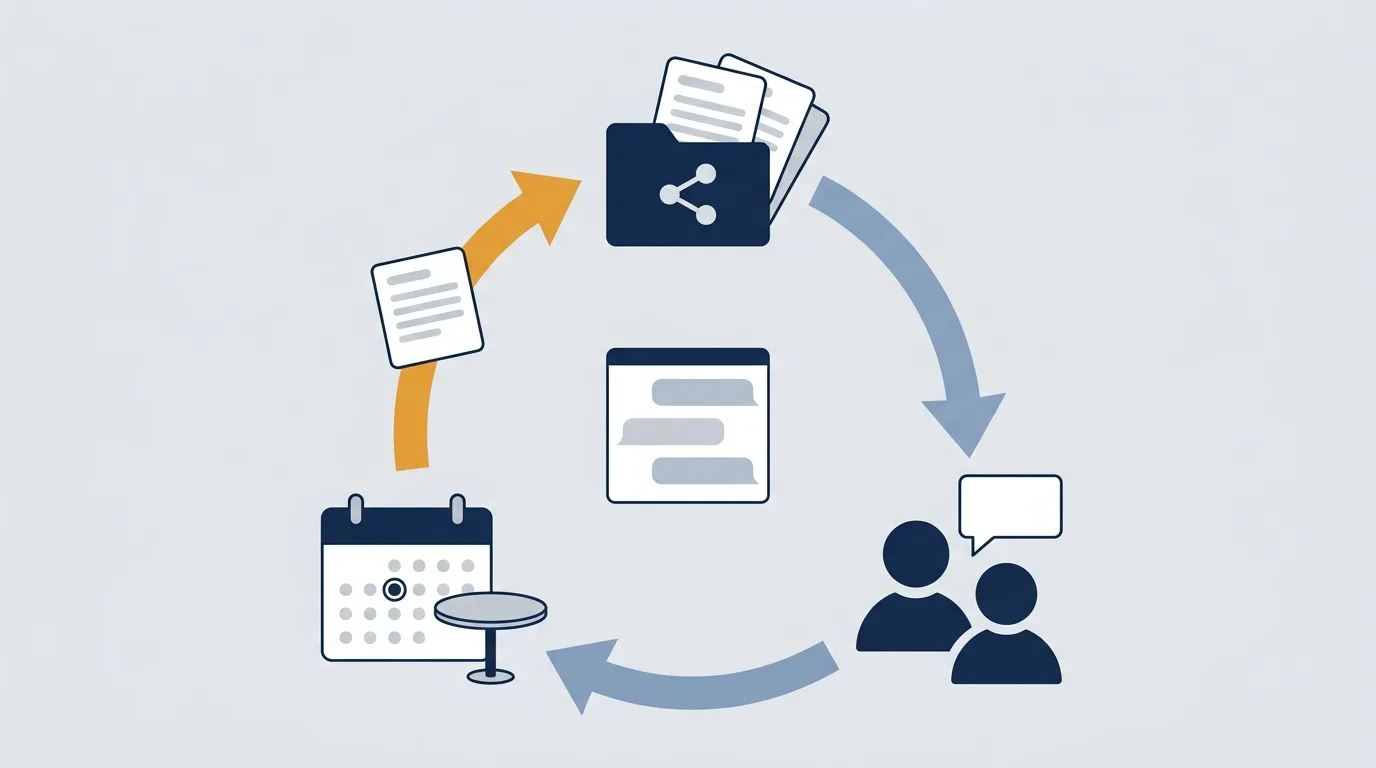
Once it can be used for one task, set up systems so that it doesn’t stop. Nothing elaborate is needed. With the following three, it is easier to keep going even if the person in charge changes.
A place to share usage “templates”
Gather instructions (prompts) that worked well and notes on the procedures in one place. A shared folder or a dedicated chat channel is enough. With templates, new users only need to rewrite them. Not having to come up with instructions from scratch is the most effective way to increase the number of users.
Someone to ask when stuck
Decide on people inside the company whom staff can ask when “it isn’t giving the answer I expected.” To avoid concentrating this on one person, the ideal is to spread out who people can ask, such as one person per department. Without someone to ask, people who get stuck stop using it at that point.
A monthly review
Once a month, for about 15 to 30 minutes, bring together the tasks it is being used for, what went well, and what was difficult. If you add the successful uses gathered here to the place where templates are kept, the company’s know-how grows little by little. It also serves as the place to decide which work to expand to next.
Summarize where to draw the line on what information may be entered in a one-page document, such as “do not enter customers’ personal names” and “confidential materials only up to this extent.” With rules, careful people can use it with peace of mind, and accidental entry can be prevented. How to put them together is covered in detail in “How to Set Internal Rules for AI Use.” Also check the settings of the tools you use (such as settings that prevent what you enter from being used for training). Setting names and locations differ by service and may change, so the reliable approach is to confirm them in each service’s official guidance.
Judge the Results by “Whether the Procedures Changed” Rather Than “Time”
Results not being visible was one of the reasons AI stops being used. That said, strictly measuring work time takes effort and doesn’t last. For small and midsize businesses, the realistic approach is to look at things like the following.
- The number of tasks replaced by procedures that use AI: Count the tasks whose procedure documents now include an AI step, such as “creating meeting minutes” or “drafting replies to inquiries.”
- The rough change for each task: At the monthly review, ask the person responsible for each task “how much easier it has become compared with before.” It does not have to be a precise number.
- The number of people using it: Check how many of the people with accounts actually use it.
If you record these three things once a month, you will have material to work from when deciding whether to continue the subscription. Once you know which work it isn’t being used for, you can choose whether to turn that around or reduce the corresponding accounts.
Criteria for Deciding Whether to Use Outside Hands-On Support
The steps so far can be carried out internally. However, in situations like the following, it is hard to proceed internally alone, and outside support is worth using.
| Situation | Proceed internally | Consider outside hands-on support |
|---|---|---|
| Someone to lead the effort | There is a person who can spend part of their working hours on it | The person in charge is stretched thin with other duties, or no one can be assigned |
| Deciding which work to start with | Candidate tasks have already been identified | You are stuck because you can’t decide where to start |
| Internal know-how | There is someone knowledgeable about AI in the company | No one is knowledgeable, or the knowledge is concentrated in one person |
| Reviews | You can run a monthly session internally | Review sessions were set up but didn’t last |
When using outside support, set the goal of reaching a state where the company can eventually run it on its own. If it stays in a state where it can’t be used without the outside person, it will stop in the same way once the support ends. The ideal approach is to move the template location, the people to consult, and the review sessions into the company during the support period.
The monthly hands-on support in our AI Utilization & Business Process Improvement Support works with you through a monthly regular meeting and consultations by chat, from choosing which work to use AI for to reviewing work procedures and making it stick. If you are at the stage of wanting to sort out your current situation first, you can also start with a 60-minute brainstorming consultation.
Frequently Asked Questions
- Once an AI tool has fallen out of use, is it better to cancel it and switch to a different tool?
-
First, check why it fell out of use. If the reason lies in how it was introduced, such as “no situations for using it were decided” or “there was no one to consult,” you will stall at the same point even if you change tools. Switching is worth considering only if you find that it lacks a feature needed for a specific task.
- Should we stop giving accounts to all employees?
-
Handing them out is not bad in itself. The problem is handing them out without deciding which work they will be used for. At the turnaround stage, fewer accounts will go unused if the people responsible for the first task you chose start using it, and you expand the scope after the procedure for that task is firmly set.
- If employees are reluctant to use AI, should we make it mandatory?
-
Before making it mandatory, ask why they don’t use it. The right approach differs depending on whether they are anxious because they don’t know what information may be entered, don’t know how to use it, or find the current procedure faster. If an AI step is written into the procedure document and it has become the easiest way to get the work done, it will be used without being made mandatory.
Summary
It is not unusual for AI to fall out of use inside a company. Most of the causes lie not in the tool but in how it was introduced, and they can be fixed if you deal with them one at a time.
- The biggest reason it falls out of use is starting with “please try using it” without deciding what to use it for
- Other reasons that tend to pile up are leaving it to one person, the first failure, invisible results, and having no rules on what to enter
- Turning it around starts with choosing one task that repeats every week and where mistakes can be fixed internally
- In that task’s procedure, write down who checks what, and in what order
- Use three things, a place for templates, people to consult, and a monthly review, so that it doesn’t stop even if the person in charge changes
- Consider outside hands-on support when you cannot assign someone to lead the effort, or when you are stuck deciding which work to start with
Start by asking the people in your company who still use AI “what they use it for.” If you find even one way of using it that has lasted, that becomes the starting point for turning things around.







