
“I’ve heard of JAMstack, but what actually is it?”
You may be seeing this term more and more in web development meetings or while researching. However, most explanations are written for engineers, and I think most people are left wondering, “Does this have anything to do with my company?”
In this article, I explain what JAMstack means and how it differs from traditional websites, in a way that makes sense even if you’re not familiar with IT.
In short, JAMstack is a way of building websites that excels in page speed, security, and running costs. It offers real benefits for small and medium-sized business websites too.
What Is JAMstack? — Understanding It from the Name
What the Three Letters of “JAM” Stand For
The “JAM” in JAMstack is made up of the initial letters of the following three elements.
- JavaScript — the technology that handles movement and interaction on the site
- API — the mechanism for exchanging data with external services
- Markup — the files (HTML) that create the site’s appearance and structure
And “stack” means “a combination of technologies.”
In other words, JAMstack is a method of building websites by combining JavaScript, APIs, and HTML files.

The Biggest Difference from Traditional Websites
With traditional websites (such as WordPress), the server builds the page in real time every time a user visits the site.
Think of it like a made-to-order restaurant that starts cooking only after you order. Since every dish is cooked in the kitchen (the server) each time, there are waits when it gets busy.
JAMstack, on the other hand, prepares finished pages in advance and delivers them as they are.
Picture a bento shop instead. Because staff simply hand over bento boxes made in advance, no matter how many customers come, nobody is kept waiting.
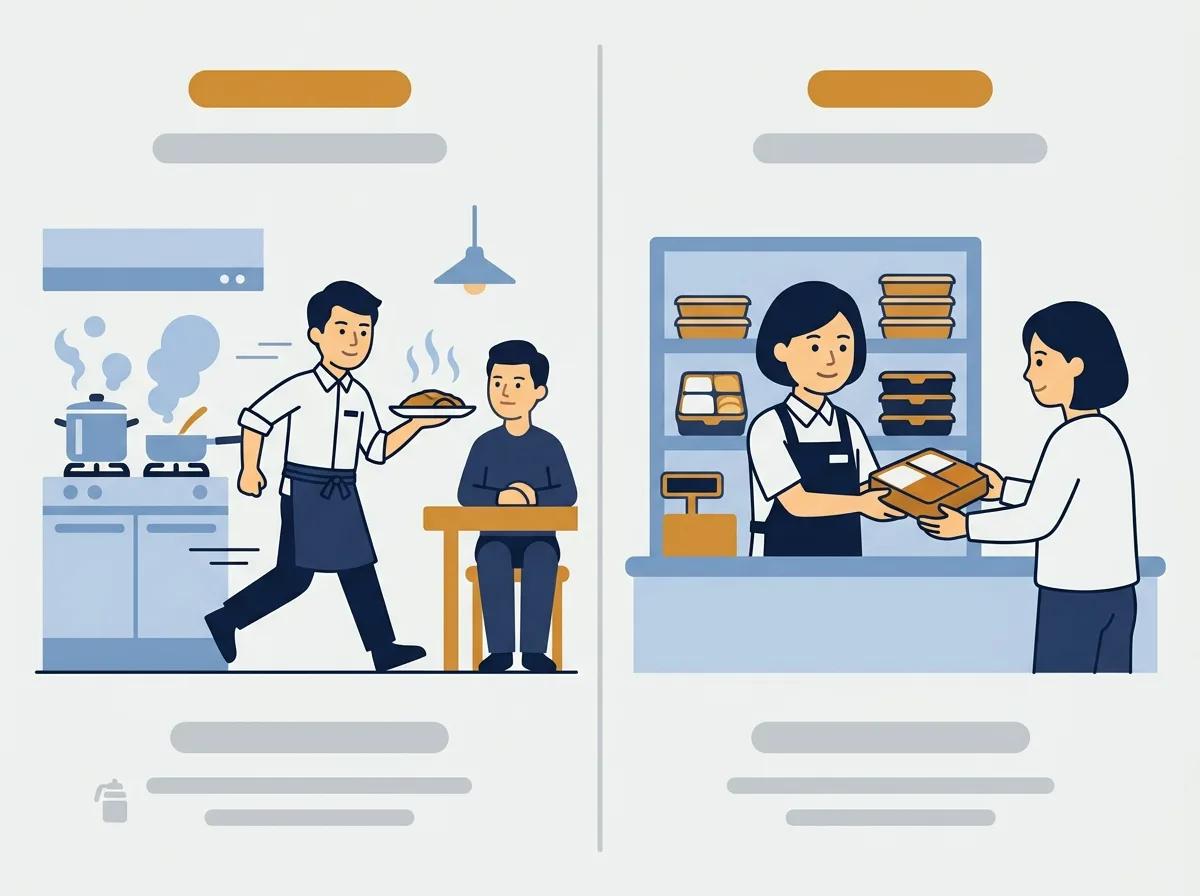
This mechanism of “generating pages in advance” is called pre-rendering. It is JAMstack’s defining feature and the source of its benefits.
How Traditional Websites (WordPress, etc.) Work — Start with the Basics
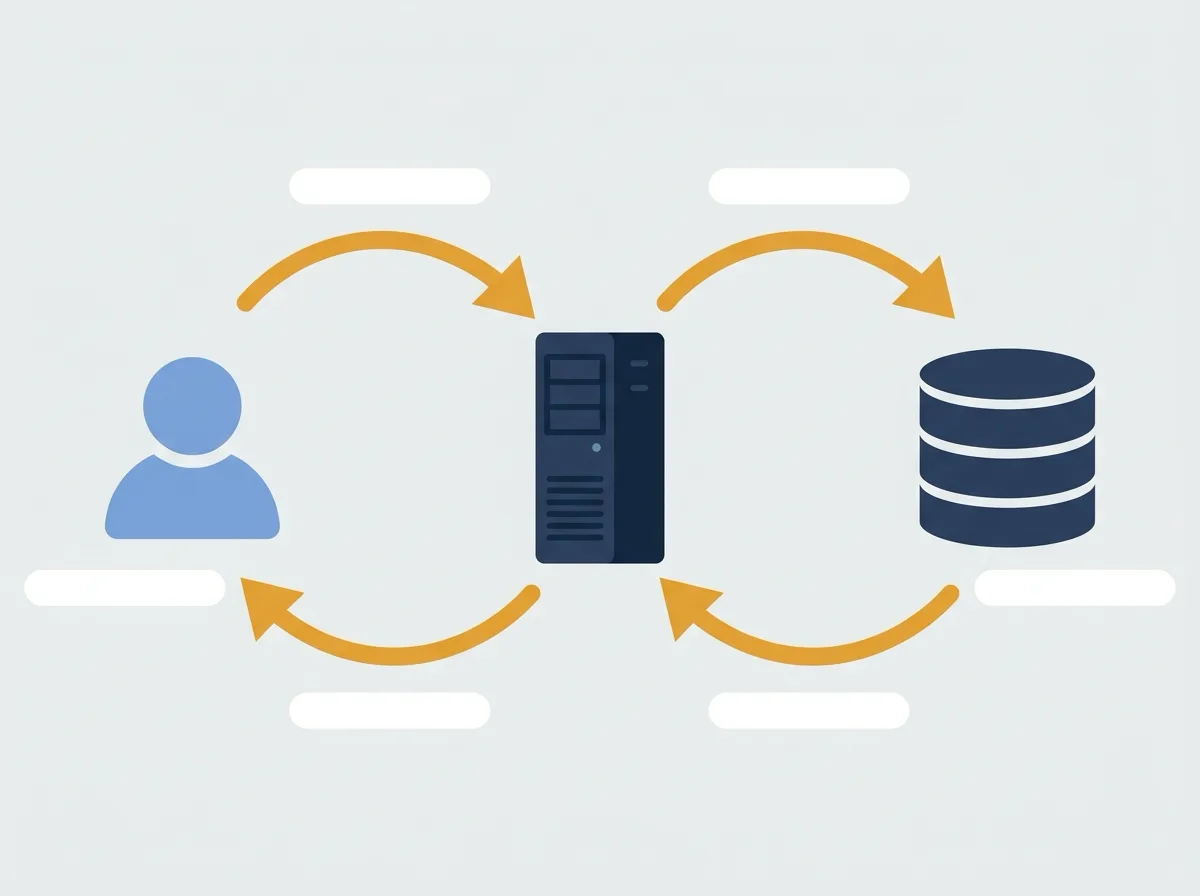
The Server Works on Every Visit
Traditional websites, especially those built on a CMS (content management system) like WordPress, display pages through the following flow.
This process happens every single time someone visits.
Issues with the Traditional Approach
This mechanism comes with several issues.
- Page speed: Because server processing time is needed, pages slow down when traffic spikes
- Security: Because the server and database are constantly communicating with the outside, they are more likely to be targeted by attacks
- Server load: Processing increases in proportion to traffic, requiring more server performance or more servers
Of course, this doesn’t mean WordPress itself is bad. About 40% of the world’s websites are built with WordPress, and it is an excellent choice for small and medium-sized business websites. That said, it is true that the issues above exist as characteristics of how it works.
How JAMstack Works — Why It’s Fast and Secure
HTML Is Generated in Advance and Then Delivered
The JAMstack flow is simpler than the traditional one.
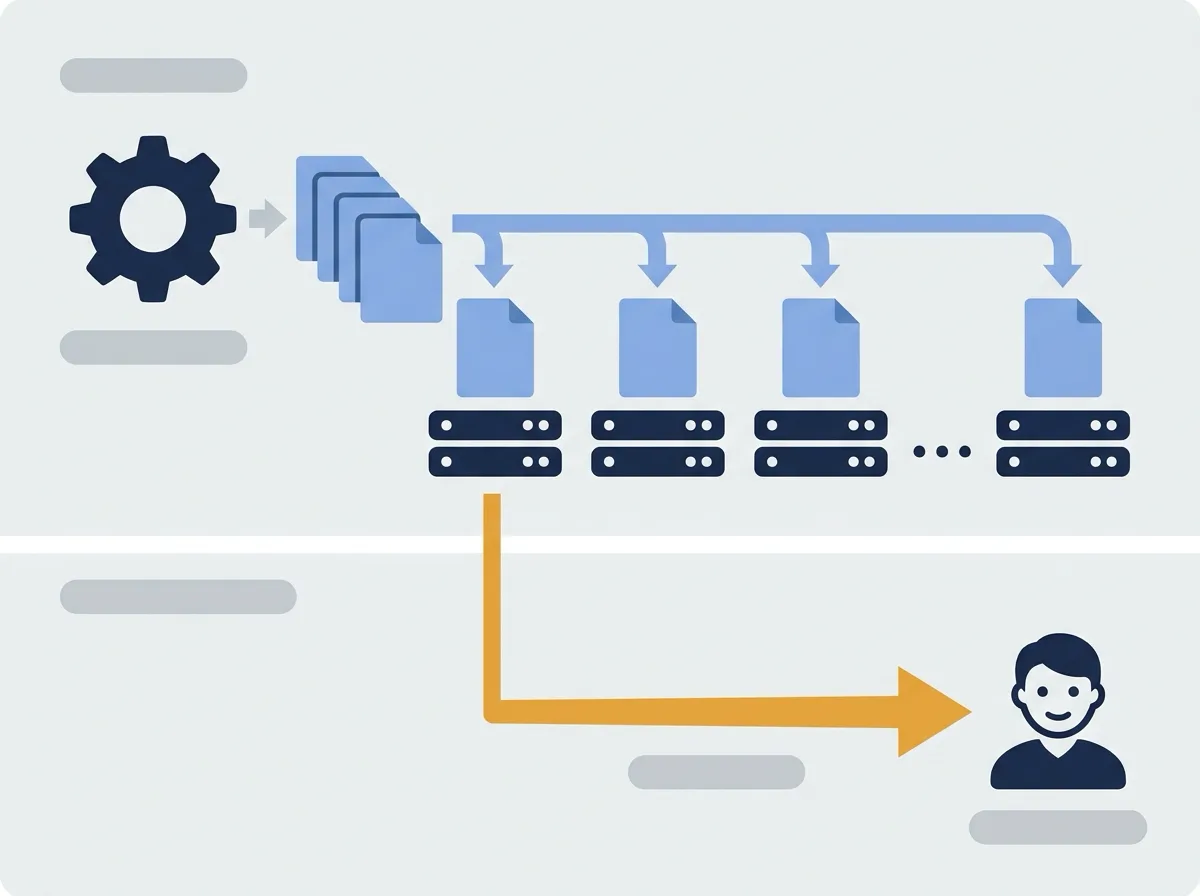
At build time (when preparing the site for publication):
- A static site generator (SSG) generates the HTML for every page in advance
- The generated HTML files are placed on a CDN (a network of servers located around the world)
When a user visits:
- The finished HTML is returned as-is from the CDN server closest to the user
That’s all. There is no querying of a database or generating of pages on a server each time someone visits.
What Is a CDN? — Delivering Content from Close to the User
A CDN (Content Delivery Network) is a network of servers distributed around the world.
Users in Tokyo are served from a server in Tokyo, and users in Osaka from a server in Osaka, so delays caused by physical distance are kept to a minimum.
With a traditional website, a single server handles all traffic, but with JAMstack the CDN spreads the load, so speed is less likely to drop even when traffic spikes.
Do you have any questions about JAMstack or the latest web technologies?
Web制作・システム開発は
First CHにお任せください
「こんなWebサイトが欲しい」「このシステムは実現できる?」——
現役エンジニアが直接お話を伺い、最適な進め方をご提案します。
「まだ構想段階」「費用感だけ知りたい」というご相談も歓迎です。
Three Benefits of JAMstack — What It Offers Small and Medium-Sized Businesses
Benefit 1: Dramatically Faster Page Speed
Sites built with JAMstack load significantly faster than traditional sites.
The reason is simple: they just return finished HTML files as they are. Server processing time is almost zero, and with CDN delivery on top of that, pages load very quickly.
Page speed also affects Google search rankings. Since 2021, Google has included “Core Web Vitals,” a set of page performance metrics, as a factor in search rankings. In other words, a fast site is also an advantage for SEO.
It also directly affects user behavior. According to Google research, 53% of users leave if a page takes 3 seconds or longer to load. Page speed is a question of “whether people are willing to wait,” and it has a direct impact on your business.
Benefit 2: Strong Security
JAMstack is structurally a more secure approach.
With a traditional website, the server and database are always running, so there are many entry points for attacks (the attack surface). WordPress in particular is used all over the world, so attacks exploiting plugin vulnerabilities and targeting login screens happen every day.
JAMstack, on the other hand, delivers only static HTML files to users.
- There is no direct access to a database
- There is no server-side processing (= fewer things to attack)
- The admin interface is separated from the site
To be honest, no system can ever be “completely secure.” However, having structurally fewer targets for attack is a major advantage.
Benefit 3: Easier to Keep Running Costs Down
Because JAMstack sites mainly deliver static files, a high-performance server isn’t required.
With a traditional website, as traffic grows you need to upgrade server performance or add more servers. With JAMstack, the CDN automatically distributes the load, so costs rise only gradually as traffic increases.
Hosting services built for JAMstack, such as Vercel and Netlify, can be used on a free plan for small sites. In some cases, monthly server costs can be cut significantly.
Drawbacks and Caveats of JAMstack — An Honest Look
Drawback 1: Not Well Suited to Real-Time Updates
Because JAMstack works by “generating pages in advance,” a rebuild (regeneration) is required every time content is updated.
For example, even adding a single blog post may trigger a build of the entire site. For a small site this finishes in tens of seconds, but for sites with many pages it can take several minutes.
For uses such as “updating 10 or more articles every day” or “showing inventory information in real time,” JAMstack alone is hard to work with, and additional measures are needed.
Drawback 2: There Is a Technical Hurdle
If you’re used to the simple workflow of WordPress, where you “update articles straight from the admin screen,” running a JAMstack site may feel somewhat complicated.
However, this issue can be solved by combining it with a headless CMS (a service that provides only the admin interface). With services such as microCMS or Contentful, you can manage content with an experience close to WordPress.
Drawback 3: Fewer Web Agencies Can Handle It
Because JAMstack is a relatively new technology, there are still few web agencies and freelancers who can work with it.
There are many WordPress developers, but developers who can handle JAMstack (Next.js, Gatsby, etc.) are limited. When choosing who to hire, it’s important to check their track record.
Sites JAMstack Suits and Sites It Doesn’t
Sites It Suits
| Site characteristics | Why JAMstack fits |
|---|---|
| Corporate sites (5–30 pages) | Limited number of pages and infrequent updates |
| Blogs and owned media | Works well with static generation and makes the most of fast page speed |
| LPs (landing pages) | Fast loading directly affects conversion rates |
| Recruitment sites | Security is a priority, and updates are moderate |
Sites It Doesn’t Suit
| Site characteristics | Why JAMstack is a poor fit |
|---|---|
| E-commerce sites (large-scale) | Require real-time inventory management and payment processing |
| Membership sites | Need to dynamically generate different pages for each user |
| Frequently updated portal sites | Each build becomes a bottleneck |
| Internal management systems | Mainly dynamic processing, so the benefits of static generation can’t be used |
That said, with modern frameworks like Next.js, you can choose between static and dynamic generation on a page-by-page basis, so there are more and more situations where even the “poor fit” cases above can be handled.
Summary Comparison: Traditional Websites vs. JAMstack
| Aspect | Traditional website (WordPress, etc.) | JAMstack |
|---|---|---|
| Page speed | Server processing involved (somewhat slower) | Static delivery + CDN (very fast) |
| Security | Many attack targets (countermeasures needed) | Few attack targets (structurally secure) |
| Running costs | Depend on server performance | Low cost with CDN delivery |
| Content updates | Reflected immediately from the admin screen | Rebuild required (tens of seconds to several minutes) |
| Availability of developers | Very many | Still few |
| Customizability | Easy to extend with plugins | Mainly developed in code |
| Learning curve | Low (intuitive admin screen) | Somewhat high (can be eased with a headless CMS) |
Summary — JAMstack Is Worth Knowing as “One of Your Options”
JAMstack is a modern way of building websites that excels in page speed, security, and scalability.
However, JAMstack isn’t the best choice for every site.
- If you update infrequently and prioritize page speed and security → JAMstack is a strong option
- If you prioritize an easy-to-use admin screen and a wide range of plugins → WordPress remains a strong option
- If you want the benefits of both → there’s also the combination of headless WordPress + Next.js
What matters is not “JAMstack, so it’s good” or “WordPress, so it’s outdated,” but choosing the technology that fits your site’s purpose and how you’ll run it.
I have experience building sites with both WordPress (SWELL) and Next.js, so I recommend the best technology for each client’s situation. If you’re unsure which is right for your site, please feel free to get in touch.
Related articles:
- WordPress vs. Next.js: A Thorough Comparison | Which Is Best for a Small Business Website?
- What Is a Headless CMS? A Gentle Explanation of How It Differs from WordPress and Its Benefits
- What Are Core Web Vitals? Why Small and Medium-Sized Businesses Should Address Them
At First CH, we work with both WordPress (SWELL) and JAMstack (Next.js). Rather than judging which technology is better, we help you make the choice that best fits your business.
Web制作・システム開発は
First CHにお任せください
「こんなWebサイトが欲しい」「このシステムは実現できる?」——
現役エンジニアが直接お話を伺い、最適な進め方をご提案します。
「まだ構想段階」「費用感だけ知りたい」というご相談も歓迎です。







